Sphinx – Sphinx
Sphinx Roles
Sphinx inline markup is down through interpreted text roles;
they are written :rolename:`content`..
There are four types of roles:
The ReStructuredText Text Roles, which are valid both for ReStructuredText and Sphinx.
The Sphinx cross references Roles which extend and are preferred to ReStructuredText cross references
The markup roles
The roles added by Sphinx domains like the Python roles referenced below.
Location cross references
sphinx ref: Cross-referencing arbitrary locations which defines the sphinx role ref.
We use:
:ref:`displayed text <label>`
To reference label defined in any document of the project.
It allows linking across files, while the rest way
is limited to a location in the same file.
If the label definition is followed by a section title then
displayed text can be omitted and will be replaced by the section
title.
E.g. the ReST – reStructuredText Explicit hyperlink target section is preceded
with .. _explicit_target:, so we have:
|
|
|
We can also use as reference target a name option like
|
See also Difference between ReST and Sphinx location reference in the ReST chapter.
Automatic labels for sections
Sphinx as an extension autosectionlabel that allow to reference each section by its title. Its is similar to Implicit Hyperlink Targets, but works across document.
In the ReST chapter we have used an Implicit Hyperlink Targets with:
`Transition`_
`how to draw an horizontal line <Transition>`_
we cannot use in the present chapter this ReST way of referencing a target because ReST processor know only one document. but we can use it with the autosectionlabel extension with
| The section :ref:`Transition` show
| :ref:`how to draw an horizontal line <Transition>`
| in your document.
|
Once you use the autosectionlabel extension Sphinx will detect duplicate labels, in contrast with Implicit Hyperlink Targets autolabel define a new label for each section, so if you have manually put a label before a section title which is identical to the title, it will be detected as duplicate.
These duplicate are harmless since they reference the same point. But some title in many
document can be identical, you can have many introduction or conclusion in different
parts. The duplicate may be problematic as any one can be matched by a reference. To
disembiguate the labels there is an configuration option beginning version 1.6
autosectionlabel_prefix_document which prefix the automatic labels with with the
name of the document it is in, followed by a colon.
With this setting instead of :ref:`Transition` you have to use
:ref:`ReST:Transition` it avoid a potential ambiguity with a Transition paragraph
in an other document, and has the additional benefit to avoid also all ambiguities with
explicit labels in your documents.
Cross-referencing documents.
sphinx ref: Cross-referencing documents
In Sphinx it is possible to reference a document as follows
|
Extra cross-reference roles
Several are described in the sphinx ref: Cross-referencing other items of interest.
To reference a Python Enhancement Proposal use :pep:, for a
Request for Comments :rfc:
Extensions that define new hyperlinks targets
The intersphinx extension generates automatic links to the documentation in other projects for objects not in your own project. It interprets the references to roles
To configure it, give in
conf.pya dictionary like:intersphinx_mapping = { 'python': ('http://docs.python.org/3', None)}The extension extlinks help when you have many links pointing to the same site. You use a configuration like:
extlinks = {'sphinx': ('http://www.sphinx-doc.org/en/master/%s', 'Sphinx: %s')}Here extlinks is a dictionary, the second item of the tuple is the default caption, it must contain exactly one %s which will be replaced by the value substituted in the link. The second element can also be None, in this case the full url is used.
with this setting when you write:
See also :sphinx:`Using Sphinx <using.html>` or :sphinx:`faq.html`.
you get
See also Using Sphinx or Sphinx: faq.html.
Markup Roles.
Ref: Semantic markup roles.
They don’t generate a cross reference but only format the text in a different style.
Some common markup are:
|
RFC |
|
|
|
|
|
|
|
|
Python Roles.
role |
reference |
|---|---|
|
module |
|
function |
|
module-level variable. |
|
constant |
|
class [2] |
|
|
|
data attribute of an object |
|
exception [2] |
You may supply an explicit title and reference target: :role:`title
<target>`.
Sphinx directives
Sphinx includes its own directives, which are not available in the docutils builders.
Sphinx Math.
The math directive is yet present in docutils ReST, but the rendering in Sphinx, which is done through extensions, extend the original docutils math extension. We give here some examples of its use.
You then can type standard LaTeX math expressions, either inline:
:math:`‹LaTeX math expression›`
or in display mode:
.. math::

   ‹LaTeX math expressions›
The second version is also available for a one line expression:
.. math:: ‹1 Line LaTeX math expression›
E.g:
Pythagoras 

Multiline Math
Sphinx Built-in Mechanism
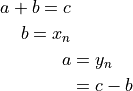
Several lines of math expressions can be entered by leaving a blank line between
them. In addition there is something like an align environment syntax if
lines are not separated by a blank line.
Explicit LaTeX with amsmath mechanism
If the option nowrap is specified then the full LaTeX code (including the
math-environment) has to be given. We can assume that the amsmath
package is loaded. This is not limited to math typesetting, any LaTeX
construct can be rendered in this way.
.. math:: \[a = b\]
   :nowrap:

or equivalenty

.. math::
   :nowrap:

   \[a = b\]
|
or equivalenty
|
![\[a = b\]](_images/math/41c5ef79cbb44272bef96ad81604c4e497b80a89.png)
![\[a = b\]](_images/math/64215af923af990e9f651149f4f3724cdea14495.png)
Equation Numbers
Equations are labeled with the label option and referred to using:
:eq:`‹label›`
E.g:
(1)
See equation (1).
Table of contents.
.. toctree::
   :maxdepth: ‹depth›
   :glob:

   ‹file 1 without file name extension›
   ‹file 2 without file name extension›
The toctree directive create a table of contents across files.
A glob option enables to use wildcards in the filenames, e.g. /comp/*
means all files under the directory comp.
Relative names are relative to the document the directive occurs in, absolute names are relative to the source directory.
The depth can be further restricted per file by inserting the following Field list type element in the very first line of the file:
:tocdepth: ‹depth›
See toctree directive for other options.
To get a table of content inside a file, use the reST table of contents
Index.
Entries in the Index
are created automatically from all information units
like modules, classes, functions or attributes but those with a :noindex:
option.
Explicit manual entries use the index directive:
.. index:: ‹entry 1›, ‹entry 2›, !<entry 3> ...
   single: ‹entry›; ‹sub-entry›
   pair: ‹1st part›; ‹2nd part›
   triple:  ‹1st part›; ‹2nd part›; <3rd part>
The first two versions create single (sub-)entries, while pair creates two entries “‹1st part›; ‹2nd part›” and “‹2nd part›; <1st part›”; and triple makes three entries.
With the exclamation mark, the <entry 3> is the main entry for this term and is put in bold.
You can also use the keywords see and seealso with see: foo
bar or seealso: bar foo.
Glossary.
A glossary is a Definition list:
.. glossary::
   :sorted:

   name1
   name2
      definition of both name1 and name2
Note, Warning, Seealso.
They are paragraph-level markups.
Note
This is a note.
Warning
This is a warning.
Selective inclusion.
A block may be included depending of the presence of some tag (Sphinx ref):
..only:: <expression>
The expression is made of tags combined in boolean expressions
like html and draft.
The format and the name of the current
builder is set as predefined tag, if needed it can be prefixed to differentiate
format and builer, like format_html or builder_html
You can define tags via the -t command-line option of sphinx-build.
In the configuration file you can use
tags.has('tag') to query,
tags.add('tag') and tags.remove('tag') to change.
An alternative is the ifconfig directive
from the ifconfig extension:
.. ifconfig:: <Python expression>
To evaluate the expression all variables registered from conf.py
are availables, to add a config value use the setup function in
conf.py:
def setup(app):
 app.add_config_value('newconf', 'default', True)
the third parameter should always be True.
Defining a css class for some part.
There is at least three ways of doing it:
.. role:: red

An example of :red:`red text`.

.. container:: red

   Here the full block is red.

An undecorated paragraph.

.. class:: red

This paragraph too is is red.

.. admonition:: Big warning
   :class: red

   Big warning text is red.
After applying rst2html you get:
<p>An example of <span class="red">red text</span>.</p>
<div class="red container">
Here the full block of test is red.</div>
<p>An undecorated paragraph.</p>
<p class="red">This paragraph too is is red.</p>
<div class="red admonition">
<p class="first admonition-title">Big warning</p>
<p class="last">Big warning text is red.</p>
Here I have taken the admonition directive as example but any directive that allow the :class: option would do.
As it generates a span the role directive is the only one that allow to apply your style to a part of a paragraph.
The class works as expected with rest2html, but directive fail with
Sphinx. You have to replace it with
.. rst-class:: red

This paragraph too is is red.
Sphinx use rst-class to replace the ReSt class
directive that is shadowed by Sphinx. This is only stated in a small
footnote of Sphinx reSt Primer.
Using your new style
To use your new class you need a css style like:
.red {
  color: red;
}
You put it in a stylesheet, to give it’s location:
- With
rst2htmlyou must specify the stylesheet’s location with a --stylesheet(for a URL) or--stylesheet-pathfor a local file.
- With
With Sphinx a flexible solution is to add your own css file in the
_staticdirectory and give its location with a template that you put in the_templatedirectory. You can use a filelayout.htmlwich extend the original template of the same name:{% extends "!layout.html" %} {% set css_files = css_files + ["_static/style.css"] %}For more details refer to Sphinx: Templating.
Sphinx Source Code.
Code highlighting.
The code blocks are highlighted by sphinx, there is a default language
of Python that can be changed in the configuration, by setting the
configuration option highlight_language.
The default Highlighting language used by Pygment in Literal Blocks is set for following snippets of code examples by:
.. highlight:: ‹language›
   :linenothreshold: ‹number›
The option language may be any language supported by a Pygment lexer.
The additional linenothreshold option switches on line numbering
for blocks of size beyond ‹number› lines.
When using Sphinx you can specify the highlighting in a single literal block:
.. code-block:: ‹language›
   :linenos:

   ‹body›
The linenos option switches on line numbering.
You can also use some options that are described for the
Source code include., namely linenos, lineno-start,
caption, name, dedent.
When using base ReST parser use instead code keyword.
Source code include.
Source code is included in Sphinx with the directive literalinclude.
To include the source file example.py as a literal block use:
.. literalinclude:: ../arithmetic/example.py
   :linenos:
1print("Hello {0}!".format("World"))
There are more options:
.. literalinclude:: ../arithmetic/example.py
   :caption: Example of code
   :name: example.py
   :language: python
   :dedent: 4
   :linenos:
   :lines: 1,3,5-10,20-
   :emphasize-line: 4,5
caption is the displayed title before the block, name is the
reST name option used as an
internal reference target.
dedent strip left whitespaces, linenos add a line numbering
alternatively lineno-start begin the numbering at the given number.
The options language and linenos set the highlighting to
‹language› and enables line numbers respectively.
You can select lines by the lines option or by
start-after: <string> and/or end-before: <string>
(<string>s are not quoted).
Whe emphasize the fourth and fifth selected line, which in the above example are the lines 5 and 10 of the source.
If it is a Python module, instead of selecting by lines you can select
a a class function or method to include by using the option
pyobject:
.. literalinclude:: ../arithmetic/example.py
   :pyobject: MyClass.some_method
For including a ReST source file use the rest directive include.
Source code directives.
There are very powerful directives in Sphinx for documenting source code, each programming langage has a specific domains .
The following markups are related to documenting python source code.
|
Marks the beginning of the description of a module |
|
The classes, functions etc. documented from here are in the given module |
|
Describes an exception class. |
|
Describes a class. [4] |
|
Describes an object data attribute. |
|
Describes an object method. |
|
Describes a static method. |
|
Describes a class method. |
|
Describes a class method. |
|
Describes a class method. |
autodoc
There is an autodoc version of the source code directives which include documentation from docstrings:
automodule,autoclass,autoexception. Document a module, class or exception. They insert the docstring of the object itself; if you add a:members:option followed by a specific list of members, they will be included in the documentation. An empty list of members includes all members... autoclass:: Noodle :members: eat, slurp
autofunction,autodata,automethod,autoattributeare used todocument the respective type of object.
autodataandautoattributesupport an annotation option taht will show not only the name but the representation of the object.
Using info field lists in Docstrings.
Inside Python object description directives the
following fields
are recognized::
param, arg, key, type, raises, raise,
except, exception, var, ivar, cvar, returns,
return, rtype, meta.
- Sphinx.divide(i, j)
divide two numbers
- Parameters:
i (int) – numerator
j – denominator
- Returns:
quotient
- Return type:
integer
- Raises:
def divide(self, i, j):
    """Divide two numbers.

    This function is to show how the docstring look, using pure Sphinx syntax,
    with explicit fields.

    :param i: numerator
    :type i: int
    :param j: denominator
    :type j: int
    :return: quotient
    :rtype: integer
    :raises: :exc:`ZeroDivisionError`
"""
- arithmetic.divide.divide(self, i, j)
Divide two numbers.
This function is to show how the docstring look, using pure Sphinx syntax, with explicit fields.
- Parameters:
- Returns:
quotient
- Return type:
integer
- Raises:
Numpy alternate syntax for docstrings.
The previous fields have a very good rendering in Sphinx, but they are quite cumbersome for the programmer and make the code cryptic. Two alternates syntaxes are popular the Numpy docstring syntax and the Google docstring syntax.
These two styles are not recognized directly by the autocode extension but should
preprocessed.
The extension napoleon preprocess NumPy and Google style docstrings and converts them to reStructuredText before Sphinx parse the source code. You need to configure it in your conf.py file.
We gives an example of NumPy/SciPy style of documentation.
def example(arg1, arg2):
    """ Divide two float numbers

    This is a Numpy docstring example.

    Parameters
    ----------
    arg1 : float
        the first value
    arg2 : float
        the second value

    Returns
    -------
    float
        arg1 divided by arg2

    Raises
    ------
    ZeroDivisionError
       when the second value is null.

    Examples
    --------
    >>> import template
    >>> a = MainClass()
    >>> a.example(6,2)
    1.5

    Warning
    -------
    arg2 must be non-zero.

    Notes
    -----
    Make sure we are using numpy syntax [1]_

    See Also
    --------
    :py:exc:`ZeroDivisionError`

    Todo
    ----
    We should use type inference

    References
    ----------
    .. [1] `Numpy Style Guide`_

    """
- arithmetic.docstring.example(arg1, arg2)
Divide two float numbers
This is a Numpy docstring example.
Parameters
- arg1float
the first value
- arg2float
the second value
Returns
- float
arg1 divided by arg2
Raises
- ZeroDivisionError
when the second value is null.
Examples
>>> import template
>>> a = MainClass()
>>> a.example(6,2)
1.5
Warning
arg2 must be non-zero.
Notes
Make sure we are using numpy syntax [1]
See Also
Todo
We should use type inference
References
NumPy style guide includes many small examples, the Sphinx Manual includes a larger Numpy style example, and Material for Sphinx has a big Polynomial Class (source) and generated result.
Google style docstrings.
If we want to follow the style of PEP257 we can use the Google Python style guide also recommended by the Khan Academy Style Guide.
def example(arg1, arg2):
    """Division of two reals.

    This function is only to show how we can format docstrings using
    Google Style Guide.

    Args:
        - arg1 (float): The first value.
        - arg2 (float): The second value, cannot be Nul.

    Returns:
        float: Division arg1/arg2.

    Raises:
        ZeroDivisionError: if arg2 is zero.

    Example:
        >>> import template
        >>> a = MainClass()
        >>> a.example(6,2)
        1.5

    Todo:
        Check that arg2 is non zero, and throw an exception.
"""
- arithmetic.gstyle_docstring.example(arg1, arg2)
Division of two reals.
This function is only to show how we can format docstrings using Google Style Guide.
- Args:
arg1 (float): The first value.
arg2 (float): The second value, cannot be Nul.
- Returns:
float: Division arg1/arg2.
- Raises:
ZeroDivisionError: if arg2 is zero.
- Example:
>>> import template
>>> a = MainClass()
>>> a.example(6,2)
1.5
- Todo:
Check that arg2 is non zero, and throw an exception.
The Sphinx Manual <> includes a larger Google style example.
How napoleon transform my docstrings.
We may be curious to know what exactly napoleon generates. It can allow us to fix error in the output by changing our docstring or adding Sphinx fields.
We can call napoleon from python to learn what it generates:
>>> docstring="""
... Division of two reals.
...
..."""
>>> from sphinx.ext.napoleon import Config
>>> from sphinx.ext.napoleon.docstring import GoogleDocstring
>>> config = Config(napoleon_use_param=True, napoleon_use_rtype=True)
>>> print(GoogleDocstring(docstring), config)
And we have the decorated result:
Division of two reals.

This function is only to show how we can format docstrings using
Google Style Guide.

:param - arg1: The first value.
:type - arg1: float
:param - arg2: The second value, cannot be Nul.
:type - arg2: float

:returns: Division arg1/arg2.
:rtype: float

:raises: :exc:`ZeroDivisionError` -- if arg2 is zero.

.. rubric:: Example

>>> import template
>>> a = MainClass()
>>> a.example(6,2)
1.5

.. todo:: Check that arg2 is non zero, and throw an exception.
If you want to experiment with output of napoleon you can look at
the parameters of GoogleDocstring in the Napoleon source code